
Free science pilot | Grade 8 | MS-PS1-1 | No online account
Medicine Bow Field Station
Build the molecule. Extend the crystal. Explain the difference.
A one-stop Grade 8 science pilot set at a field station in a Medicine Bow-inspired landscape. Students use composition cards to build and repair simple molecules, extend a repeating crystal slice, and choose a claim and evidence about how a molecule differs from an extended structure. Then they answer a short exit question with new substances. Target time: 10–15 minutes (classroom timing is not yet measured).
Pole Mountain Learning: Simple to use. Designed for meaningful science practice.

Practice, one retry, then a fresh exit question
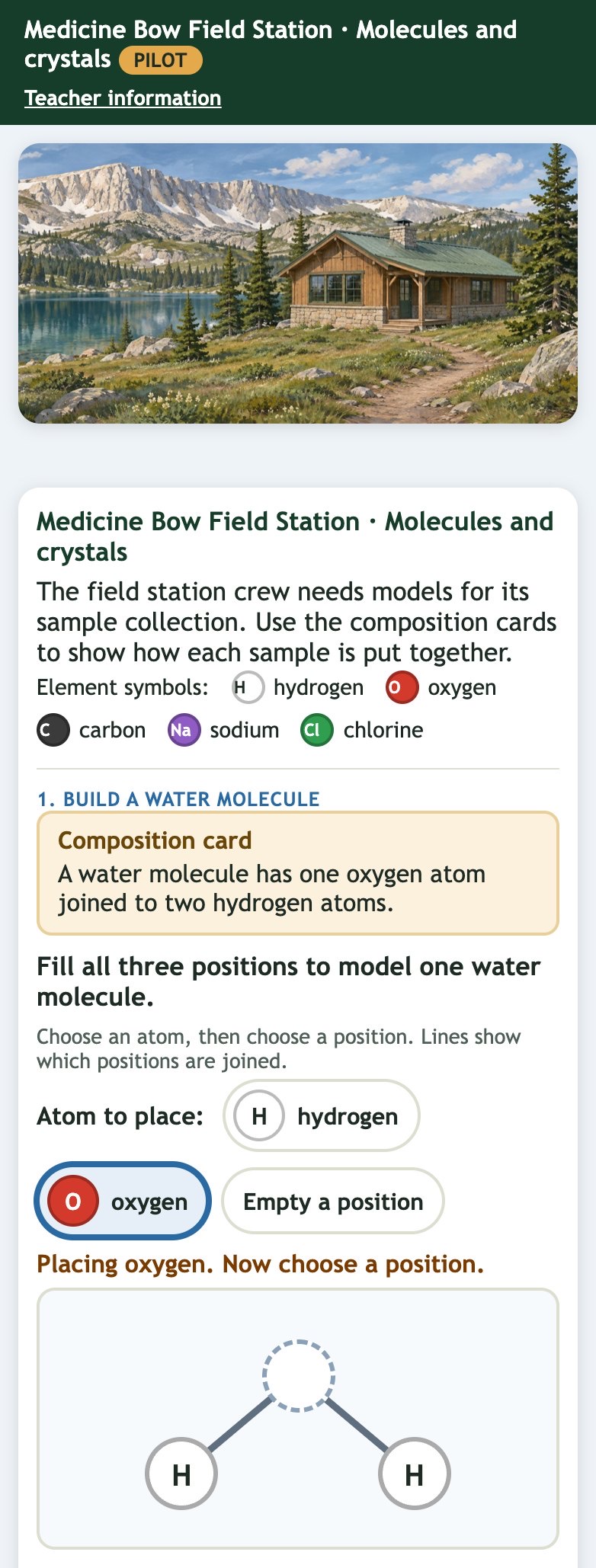
Students work four practice tasks: build a water molecule, repair a carbon dioxide model, extend a rock salt crystal, then compare the models. They choose an atom, then a position. Task 4 uses the same formats as Wyoming's state practice tests: a grid where they tick every model that matches each description, and a drop-down sentence explaining the difference. Every control works by tap, click or keyboard, and a “Show your Figure 2 and Figure 3” button repeats the student's own models beside Task 4.
After the first check, each missed task shows a hint, which stays on screen during one retry. Then every task shows a worked explanation, and the summary shows both the first-try and after-feedback counts. The summary counts five parts, because Task 4's grid and its explanation are scored separately; each counts only if all of it is right. A stop screen asks students to wait for the teacher before the exit question, which uses new substances (methanol, with two central atoms, and magnesium oxide) and shows no hints and no score.
Two ways to use it
Everyday classroom use: students practice in the game (or on student packet pages 1–2), then answer the exit question on screen or on page 3. At the stop screen, you press the button for the on-screen exit. Students may leave a part blank if they are not sure. Before each student closes the game, look at the receipt: it shows a four-character code, the practice counts (first try and after feedback) and the exit answers, with any empty position shown as blank and no exit score. On a class slip, write the student's name, the code, the practice counts and every exit answer, then score the exit against Teacher Guide page 2. The game saves nothing, so nothing can be retrieved later.
For a whole class: keep one class slip on a clipboard and walk the room as students reach the receipt, or have each student raise a hand at the receipt and wait until you have copied it before closing the game. If students take the paper exit, the receipt shows the code and practice counts only; copy those onto the slip and collect page 3 for the exit answers.
Optional paper/screen comparison: give both groups the same practice time and feedback, then the exit page for everyone with practice out of sight. The Teacher Guide (adult only) has the count and arrangement hints, the worked feedback, the exit key and how to score coded exit pages, with missing and incomplete parts recorded separately.
The stop-screen buttons are worded for the teacher, but a student can still press them, so ask students to wait for you. If the wrong button is pressed, the next screen has a “Go back” link. The paper-exit button shows a code for the student to write as their student code on page 3; students who practiced on paper use codes you assign (P01, P02 …), as the Teacher Guide explains. Leaving or reloading the game asks first, because closing it erases the student's work.
Print the pilot
- Student packet (3 pages): Pages 1–2 practice · page 3 exit question. No keys or hints.
- Shared exit question (1 page): The same exit as student packet page 3, on its own, for students who practiced on screen
- Teacher Guide (3 pages, adult only): Every practice and exit key, hints, worked feedback and routines
How to print: Print on US Letter at actual size. Give students only the student packet or the shared exit. Keep the Teacher Guide with the teacher: it has every key.
Free for classroom use. The paper practice and exit question use the same tasks and wording as the online game. Not an official Pearson, NAVVY or WY-TOPP assessment.
What it practices
Grade 8 physical science, MS-PS1-1: developing models to describe the atomic composition of simple molecules and extended structures. The molecule diagrams show which atoms are joined; the crystal grids show flat slices of a repeating arrangement. The diagrams are simplified and leave out charges and exact angles.
Nothing is saved or sent. The game keeps no record after the page closes, so look at the exit receipt (or collect the paper exit) before students close it.
Help shape the pilot
Teachers trying the pilot: tell us how long it took, what helped, what confused learners and any task that needs another look. Please leave out student names and identifying information.