
Free science pilot | Grade 4 | 4-ESS1-1 | No online account
Fossil Butte Field Camp
Read the layers. Find the fossil clues. Explain how the place changed.
A one-stop Grade 4 science pilot at a field camp inspired by Fossil Butte National Monument in Wyoming. Students build a cliff model from layer cards, use a field guide to find the fossil clues for land and for water, and choose a claim and its evidence about how the place changed. Then they answer a short exit question about a new cliff. Target time: 10–15 minutes for practice, plus 3–5 minutes for the exit (classroom timing is not yet measured).
Pole Mountain Learning: Simple to use. Designed for meaningful science practice.
Practice in state-test formats, one retry, then a fresh exit question
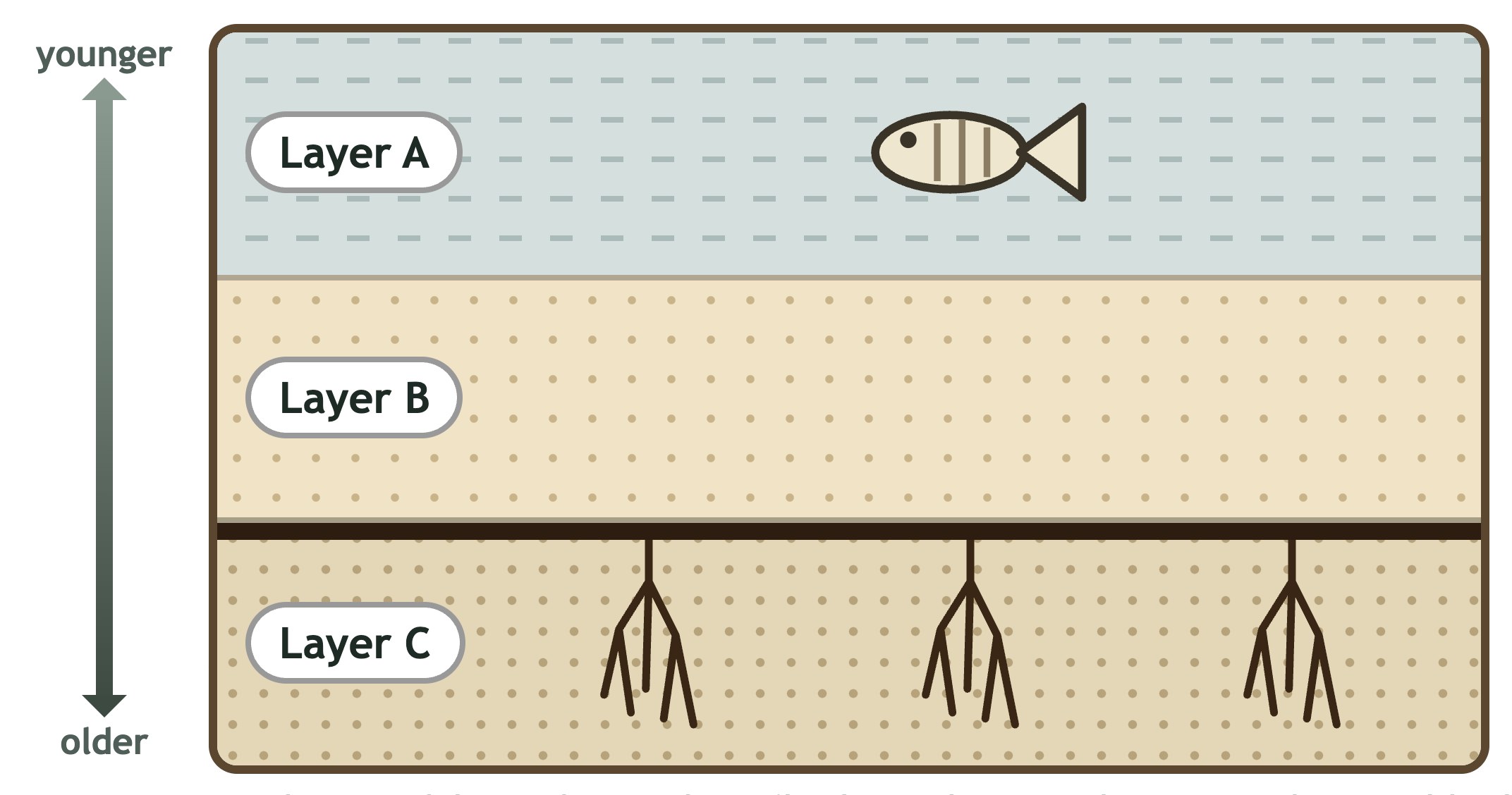
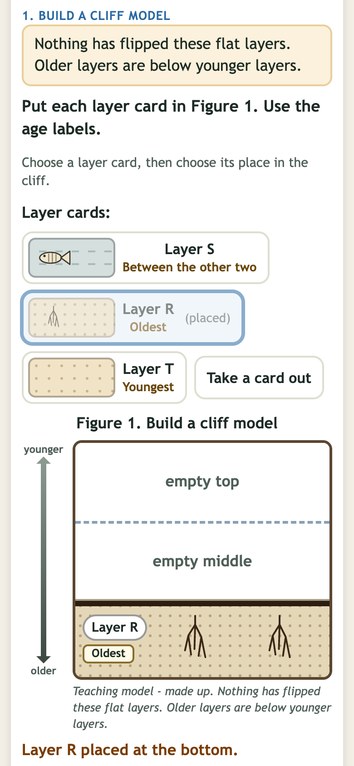
Students work three practice tasks with four scored parts: put three layer cards in order using their age labels; mark what each layer shows in a one-choice-per-row table (animals that lived in water, plants that grew on land, or no fossils shown); then choose a claim and select the two observations that support it. The question types follow the state practice tests: a table with one choice in each row, “select two” checkboxes and drop-down menus. Each drawing has a numbered title (Figure 1 to Figure 4), the field guide is Table 1, and the layer table is Table 2. Every control works by tap, click or keyboard.
After the first check, each missed part shows a hint, which stays on screen during one retry; missed answers are cleared and right ones stay locked. A part counts only when every row, menu or checkbox in it is right. Then every task shows a worked explanation, and the stop screen and receipt keep first-try and after-feedback counts apart (four scored practice parts). The exit question uses a new cliff that changed the other way, without the younger/older arrow or the layer reminder: Part A is two drop-down menus, Part B a claim and Part C “select two” evidence. It shows no hints and no score.
Two ways to use it
Share the game link (not a downloaded file) through Google Classroom or another class page; it runs in a web browser on phones, tablets and school Chromebooks. Students practice in the game or on student packet pages 1–3. At the stop screen, you choose an on-screen exit or the paper exit (student packet page 4, or the one-page shared exit). Students may leave a part blank if they are not sure.
Before each student closes the game, record the receipt: it shows a four-character code, the practice counts and the exit answers, with no exit score. For one or two students, look at the screen and write the code next to the student's name. For a whole class, have each student copy onto a paper slip their name, the code, both practice counts (first try and after feedback) and their Part A menu words and Part B and C answer letters; collect the slips before the screens close. Then score Parts A, B and C against Teacher Guide page 2, one point each; Part A needs both menus correct; Part B needs the correct claim; Part C needs exactly the two correct choices. The code only identifies the work; the game saves nothing and nothing can be retrieved later.
Codes and screens: the paper-exit button also shows a code for the student to write on the exit; for paper-only practice, assign codes such as P01 and P02. If the wrong stop-screen button is pressed, “Go back” returns to it and keeps any answers already entered. Leaving or reloading the game after a student starts asks first, because closing it erases the work.
Paper practice works the same way: students keep their first answers, you give the matching numbered hint from Teacher Guide page 2, and they make one retry. For a whole class, collect first tries, read the hints for missed parts aloud, allow one silent retry, then discuss. Keep the Teacher Guide with you: it has every key.
Using the exit scores: 0–1 of 3, revisit the field guide and read a cliff from bottom to top; 2 of 3, discuss the missed part and check a fresh cliff; 3 of 3, ask the student to explain using two fossil clues and their order. These are next teaching steps, not proficiency labels. The three parts use one cliff, so score them separately but read them together.
Print the pilot
- Student packet (4 pages): Pages 1–3 practice · page 4 exit question. No keys or hints.
- Shared exit question (1 page): The same exit as student packet page 4, on its own, for students who practiced on screen
- Teacher Guide (3 pages, adult only): Page 1 quick start · page 2 practice and exit keys, numbered hints and a tally · page 3 routines, science notes and sources
How to print: print on US Letter at actual size. Give students only the student packet or the shared exit. Keep the Teacher Guide with the teacher: page 2 has every key.
Free for classroom use. The paper practice and exit question use the same tasks and wording as the online game. Not an official Pearson, NAVVY or WY-TOPP assessment.
What it practices
Grade 4 Earth science, 4-ESS1-1: identifying evidence from patterns in rock layers and fossils to explain how a landscape changed over time. Plant roots preserved in soil show land; fish and freshwater clam fossils show water. The cliffs are flat, made-up teaching models with no rock names and no ages, and older layers are below younger layers. A layer with no fossils shown does not prove nothing lived there, and freshwater fossils alone do not tell a lake from a river.
Fossil Butte National Monument in Wyoming preserves fossils from an ancient lake. The cliffs in this pilot are invented teaching models, not reconstructions of the monument's layers.
Nothing is saved or sent. The game keeps no record after the page closes, so look at the exit receipt (or collect page 4) before students close it.
Help shape the pilot
Teachers trying the pilot: tell us how long it took, what helped, what confused learners and any task that needs another look. Please leave out student names and identifying information.